

Take the paper
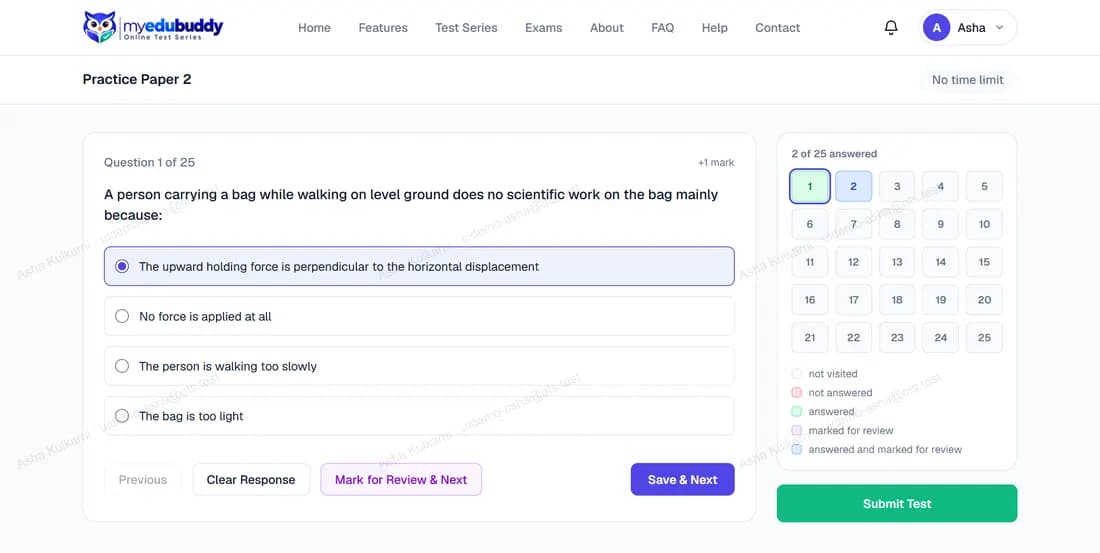
The question is on the left and the question palette on the right.
| Button | What it does |
|---|---|
| Save & Next | Records your answer and moves to the next question |
| Mark for Review & Next | Flags the question so you can find it again; an answer you chose is still counted |
| Clear Response | Removes your answer to this question |
| Previous | Goes back one question |
| A number in the palette | Jumps straight to that question |
The palette colours show each question's state: not visited, not answered, answered, marked for review, answered and marked for review.
Your answers are saved as you go. If the page reloads or your connection drops, log in again and open the paper: you continue where you stopped.
The questions are protected, on every paper and on its review afterwards, so that every student meets them fresh:
- They cannot be selected, copied, printed or saved. Right-click and the keyboard shortcuts for these do nothing.
- On the website they are covered while the test window is not in front (another program, another tab, a snipping tool). Click the page to carry on.
- In the Android app, screenshots and screen recording are blocked.
- Your name and email are written faintly across them.
Still stuck? Write to us or read the FAQ. This page follows the User Guide of 22 October 2026.